Lesson 1: Bresenham’s line drawing algorithm · TaeAhnK/TinyRenderer@c308465
+ void line(int x0, int y0, int x1, int y1, TGAImage& framebuffer, TGAColor color)
github.com
점을 그렸으니, 이제 선을 그려야 한다.
두 점을 잇는 선을 어떻게 그릴까?
픽셀 위에서는 결국 점을 찍어야 한다.
가장 간단한 방법은 보간을 사용하는 방식으로, 두 점 사이를 나타내는 식을 구하고, 시작점을 0, 끝점을 1로 둔 뒤, 0에서 1까지의 값을 함수에 넣으며 선 위의 좌표를 계산해 점을 찍는 것이다.
두 점 $(x_0, y_0)$, $(x_1, y_1)$, 보간 매개변수 $t (0 \le t \le1)$에 대해
$$
\begin{aligned}
x &= x_0 + (x_1 - x_0) \times t \\
y &= y_0 + (y_1 - y_0) \times t
\end{aligned}
$$
은 두 점을 잇는 선 위에 있다.
이걸 코드로 구현하면, 다음과 같다.
void line(int x0, int y0, int x1, int y1, TGAImage& framebuffer, TGAColor color)
{
    for (float t = 0.; t < 1.; t += 0.02)
    {
        int x = x0 + ((x1 - x0) * t);
        int y = y0 + ((y1 - y0) * t);

        framebuffer.set(x, y, color);
    }
}
이걸 이용해 선을 그려보자.
int main()
{
    constexpr int width = 64;
    constexpr int height = 64;

    TGAImage framebuffer(width, height, TGAImage::RGB);

    line(7, 3, 12, 37, framebuffer, white);
    line(12, 37, 62, 53, framebuffer, red);
    line(62, 53, 7, 3, framebuffer, blue);
    line(62, 53, 12, 37, framebuffer, green);

    framebuffer.write_tga_file("output/framebuffer.tga");

    return 0;
}
이 방식은 몇 가지 문제가 있다.
- 초록과 빨강은 같은 선을 그려야 하지만, 실제로는 다른 값이 칠해져 빨강이 보인다.
- 파랑 중간중간에 빈 공간이 있다. (7,3)과 (62, 53)을 잇기 위해선 최소한 62-7=55 픽셀이 필요하지만, t가 0.02씩 증가해 51개의 픽셀만 칠했다.
따라서 더 나은 방법이 필요하다.
t를 0.02같은 고정된 숫자만큼 늘리는 방식 대신 x를 1씩 증가시키고, 선에서의 진행도 t를 구해 y를 계산할 수 있다.
void line(int x0, int y0, int x1, int y1, TGAImage& framebuffer, TGAColor color)
{
    for (int x = x0; x <= x1; x++)
    {
        float t = static_cast<float>(x - x0) / static_cast<float>(x1 - x0);
        int y = static_cast<int>(y0 * (1.0f - t) + y1 * t);

        framebuffer.set(x, y, color);
    }
}
몇 가지 문제가 생겼다. 파랑은 사라지고, 흰색은 간격이 매우 넓어졌다.
- 파랑은 (62, 53) -> (7, 3)으로 x가 줄어들어 for문이 작동하지 않았다.
- 흰색은 x만을 기준으로 해 간격이 매우 넓다.
즉, sample이 이번에도 적절하지 않았다.
우선 파랑 문제를 해결해 보자.
void line(int x0, int y0, int x1, int y1, TGAImage& framebuffer, TGAColor color)
{
    if (x0 > x1) { // make it left−to−right
        std::swap(x0, x1);
        std::swap(y0, y1);
    }

    for (int x = x0; x <= x1; x++)
    {
        float t = static_cast<float>(x - x0) / static_cast<float>(x1 - x0);
        int y = static_cast<int>(y0 * (1.0f - t) + y1 * t);

        framebuffer.set(x, y, color);
    }
}
선이 가파를 때 흰색과 같은 문제가 생긴다.
그러면 가파를 때 x 대신 y를 쓰면 어떨까?
x 차이보다 y 차이가 더 크면 y를 기준으로 선을 그려보자.
void line(int x0, int y0, int x1, int y1, TGAImage& framebuffer, TGAColor color)
{
    bool steep = std::abs(x0 - x1) < std::abs(y0 - y1);
    if (steep) { // if the line is steep, we transpose the image
        std::swap(x0, y0);
        std::swap(x1, y1);
    }

    if (x0 > x1) { // make it left−to−right
        std::swap(x0, x1);
        std::swap(y0, y1);
    }

    for (int x = x0; x <= x1; x++)
    {
        float t = static_cast<float>(x - x0) / static_cast<float>(x1 - x0);
        int y = static_cast<int>(y0 * (1.0f - t) + y1 * t);

        if (steep)
            framebuffer.set(y, x, color);
        else
            framebuffer.set(x, y, color);
    }
}
이제 원하는 대로 선을 그리지만, 아직 비효율적인 부분이 많다.
이를 최적화한 최종 버전을 만들어보자.
튜토리얼에 따르면 이 부분에는 언급되지 않은 역사적/문화적 배경이 많고, 특히 CPU냐 GPU냐에 따라 다른 결과가 나올 것이라고 한다.
먼저 기존 방식에서 1,600만 회 정도 선을 그려보자.
int main()
{
    constexpr int width = 64;
    constexpr int height = 64;

    TGAImage framebuffer(width, height, TGAImage::RGB);

    auto start = std::chrono::high_resolution_clock::now();

    std::srand(std::time({}));
    for (int i = 0; i < (1 << 24); i++) {
        int ax = rand() % width, ay = rand() % height;
        int bx = rand() % width, by = rand() % height;

        line(ax, ay, bx, by, framebuffer, { static_cast<unsigned char>(rand() % 255),
            static_cast<unsigned char>(rand() % 255),
            static_cast<unsigned char>(rand() % 255),
            static_cast<unsigned char>(rand() % 255) });
    }

    auto end = std::chrono::high_resolution_clock::now();

    double elapsedSec = std::chrono::duration<double>(end - start).count();

    std::cout << "Line rendering time: " << elapsedSec << " s\n";

    framebuffer.write_tga_file("output/framebuffer.tga");

    return 0;
}
Line rendering time: 10.9131 s현재 방식은 픽셀마다
float t = (x - x0) / (float)(x1 - x0);
int y = y0 * (1.0f - t) + y1 * t;
를 계산한다.
이때 t에 대해 증가하는 y 비율은 항상 같다.
t와 y를 계산하는 대신, 기울기만큼 y를 누적하는 방식으로 바꾸면 y를 매번 계산할 필요가 없다.
void line(int x0, int y0, int x1, int y1, TGAImage& framebuffer, TGAColor color)
{
    bool steep = std::abs(x0 - x1) < std::abs(y0 - y1);
    if (steep) { // if the line is steep, we transpose the image
        std::swap(x0, y0);
        std::swap(x1, y1);
    }

    if (x0 > x1) { // make it left−to−right
        std::swap(x0, x1);
        std::swap(y0, y1);
    }

    float slope = (y1 - y0) / static_cast<float>(x1 - x0);
    float y = y0;

    for (int x = x0; x <= x1; x++) {
        if (steep) // if transposed, de−transpose
            framebuffer.set(y, x, color);
        else
            framebuffer.set(x, y, color);
        y += slope;
    }
}
Line rendering time: 10.0969 s여기서 우리는 기울기만큼 y를 올리고 있지만, y는 정수 좌표만 유효하다. 그러면 소수 부분을 누적했다가 정수 부분이 바뀌면 1씩 올리는 방식을 사용해 볼 수 있다.
void line(int x0, int y0, int x1, int y1, TGAImage& framebuffer, TGAColor color)
{
    bool steep = std::abs(x0 - x1) < std::abs(y0 - y1);
    if (steep) { // if the line is steep, we transpose the image
        std::swap(x0, y0);
        std::swap(x1, y1);
    }

    if (x0 > x1) { // make it left−to−right
        std::swap(x0, x1);
        std::swap(y0, y1);
    }

    float slope = abs(y1 - y0) / static_cast<float>(x1 - x0);
    int y = y0;
    float error = 0;

    for (int x = x0; x <= x1; x++) {
        if (steep) // if transposed, de−transpose
            framebuffer.set(y, x, color);
        else
            framebuffer.set(x, y, color);
        error += slope;
        if (error > 0.5)
        {
            y += y1 > y0 ? 1 : -1;
            error -= 1.;
        }
    }
}
Line rendering time: 11.8649 s연산이 늘어 시간이 늘어났다.
여기서 소수점 연산을 없앨 수 있을까?
오차를 적절히 scale해 int로 만들어보자.
void line(int x0, int y0, int x1, int y1, TGAImage& framebuffer, TGAColor color)
{
    bool steep = std::abs(x0 - x1) < std::abs(y0 - y1);
    if (steep) { // if the line is steep, we transpose the image
        std::swap(x0, y0);
        std::swap(x1, y1);
    }

    if (x0 > x1) { // make it left−to−right
        std::swap(x0, x1);
        std::swap(y0, y1);
    }

    int dx = x1 - x0;
    int dy = y1 - y0;
    int absdy2 = 2 * std::abs(dy);
    int dx2 = 2 * dx;
    int ystep = dy > 0 ? 1 : -1;

    int y = y0;
    int ierror = 0;

    for (int x = x0; x <= x1; x++) {
        if (steep)
            framebuffer.set(y, x, color);
        else
            framebuffer.set(x, y, color);

        ierror += absdy2;

        if (ierror > dx) {
            y += ystep;
            ierror -= dx2;
        }
    }
}
매번 x1 - x0으로 나누는 대신, 오차를 2*(x1 - x0)배 scale해 정수로 관리한다.
Line rendering time: 11.8008 sfloat 연산이 있는 버전보다 빨라지긴 했지만, 오히려 처음 방식보다 느리다.
CPU 관점에서 CPU는 명령어 가져오기, 해석하기, 계산, 메모리 읽기/쓰기 등의 작업을 나눠서 처리한다. 이걸 순차적으로 처리하면 느리므로 여러 명령어를 겹쳐서 처리하는 Pipelining을 사용한다.
명령어 A: 실행 중
명령어 B: 해석 중
명령어 C: 가져오는 중
그런데 if와 같은 분기문은 흐름을 끊을 수 있다.
if (condition)
{
    A();
}
else
{
    B();
}
CPU 입장에서는 다음에 실행해야 할 코드가 A인지 B인지 모른다. 따라서 condition 계산 전에 미리 사용할 명령어를 예측한다. 이때 예측이 틀리면 성능 문제가 생긴다.
따라서 여기서 병목이 생긴다.
    if (ierror > dx) {
        y += ystep;
        ierror -= dx2;
    }
이를 해소하기 위해 branchless form으로 다음과 같이 수정할 수 있다.
void line(int x0, int y0, int x1, int y1, TGAImage& framebuffer, TGAColor color)
{
    bool steep = std::abs(x0 - x1) < std::abs(y0 - y1);
    if (steep) { // if the line is steep, we transpose the image
        std::swap(x0, y0);
        std::swap(x1, y1);
    }

    if (x0 > x1) { // make it left−to−right
        std::swap(x0, x1);
        std::swap(y0, y1);
    }

    int dx = x1 - x0;
    int dy = y1 - y0;
    int absdy2 = 2 * std::abs(dy);
    int dx2 = 2 * dx;
    int ystep = dy > 0 ? 1 : -1;

    int y = y0;
    int ierror = 0;

    for (int x = x0; x <= x1; x++) {
        if (steep)
            framebuffer.set(y, x, color);
        else
            framebuffer.set(x, y, color);

        ierror += absdy2;

        int over = ierror > dx;
        y += ystep * over;
        ierror -= dx2 * over;
    }
}
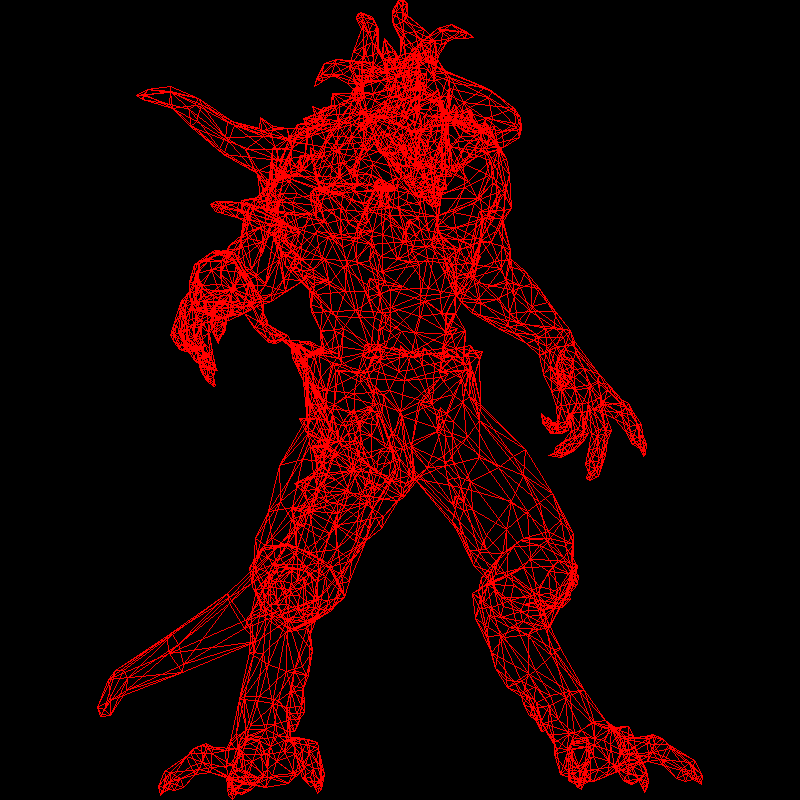
Line rendering time: 11.4141 s이제 선을 이용한 Wireframe Rendering이 가능하다.
Obj 파일은 v (x) (y) (z), vt (u) (v), vn (x) (y) (z), f (a/b/c) (ta/tb/tc) (na/nb/nc)가 나열되어 있다.
v (x) (y) (z)는 점의 3D 위치이다. 아직 TinyRender는 x와 y만 사용할 수 있다.vt (u) (v)는 텍스처의 위치이다. 이번에는 무시할 것이다.vn (x) (y) (z)는 Normal Vector로 표면이 향하는 방향을 의미한다. 빛 계산에 필요하고, 이번에는 무시한다.f (a/ta/na) (b/tb/nb) (c/tc/nc)는 연결되어 Face를 만드는 세 좌표를 의미한다. a, b, c,는 좌표를 저장한 v 인덱스, ta, tb, tc는 vt에서의 인덱스, na, nb, nc는 vn에서의 인덱스이다.
이번 목표는 z를 무시한 v를, f를 기준으로 연결해 렌더링 된 이미지를 생성하는 것이다.
먼저 v를 저장하려면 Vector3가 필요하나 Vector3가 없어 직접 구현한다.
typedef struct vec3
{
    double x;
    double y;
    double z;
} vec3;
obj 파일을 담기 위한 클래스 Model을 만들자.
model.h
#pragma once

#include <vector>
#include "geometry.h"
#include <string>

class Model
{
    std::vector<vec3> verts = {};
    std::vector<int> facet_vrt = {};

public:
    Model(const std::string filename);
    int nverts() const;
    int nfaces() const;
    vec3 vert(const int i) const;
    vec3 vert(const int iface, const int nthvert) const;
};model.cpp
#include <fstream>
#include <sstream>
#include <iostream>
#include "model.h"

Model::Model(const std::string filename)
{
    std::ifstream in;

    in.open(filename, std::ifstream::in);

    if (in.fail())
    {
        std::cerr << "Failed to open OBJ file: " << filename << '\n';
        return;
    }

    std::string line;

    while (std::getline(in, line))
    {
        std::istringstream iss(line);

        if (line.rfind("v", 0) == 0)
        {
            char prefix;
            vec3 vertex;

            iss >> prefix >> vertex.x >> vertex.y >> vertex.z;

            verts.push_back(vertex);
        }
        else if (line.rfind("f", 0) == 0)
        {
            char prefix;
            char slash;
            int a, b, c;
            int ta, tb, tc;
            int na, nb, nc;

            iss >> prefix;

            iss >> a >> slash >> ta >> slash >> na;
            facet_vrt.push_back(a - 1);

            iss >> b >> slash >> tb >> slash >> nb;
            facet_vrt.push_back(b - 1);

            iss >> c >> slash >> tc >> slash >> nc;
            facet_vrt.push_back(c - 1);
        }
    }

}

int Model::nverts() const
{
    return verts.size();
}

int Model::nfaces() const
{
    return facet_vrt.size()/3;
}

vec3 Model::vert(const int i) const
{
    return verts[i];
}

vec3 Model::vert(const int iface, const int nthvert) const
{
    return verts[facet_vrt[iface * 3 + nthvert]];
}
obj 파일을 읽을 때는 a/b/c의 값이 반드시 존재하고, 한 줄에 3번 나타나는 파일임을 가정했다.
이 데이터를 바탕으로 main에서 obj를 렌더링해 보자.
int main()
{
    constexpr int width = 800;
    constexpr int height = 800;

    TGAImage framebuffer(width, height, TGAImage::RGB);

    Model model("obj/diablo3_pose.obj");

    for (int i = 0; i < model.nfaces(); i++)
    {
        vec3 a = model.vert(i, 0);
        int ax = static_cast<int>((a.x + 1.f) * width / 2.f);
        int ay = static_cast<int>((a.y + 1.f) * height / 2.f);

        vec3 b = model.vert(i, 1);
        int bx = static_cast<int>((b.x + 1.f) * width / 2.f);
        int by = static_cast<int>((b.y + 1.f) * height / 2.f);

        vec3 c = model.vert(i, 2);
        int cx = static_cast<int>((c.x + 1.f) * width / 2.f);
        int cy = static_cast<int>((c.y + 1.f) * height / 2.f);

        line(ax, ay, bx, by, framebuffer, red);
        line(bx, by, cx, cy, framebuffer, red);
        line(cx, cy, ax, ay, framebuffer, red);
    }


    framebuffer.write_tga_file("output/framebuffer.tga");

    return 0;
}